




Event Visitor Templates: Ready-to-Use Share Cards for Every Event Type
Every event organizer eventually asks the same question: how do we get attendees to actually promote the event? The answer isn't a bigger ad budget. It's giving people something worth posting. That's what event visitor templates do. Ready-to-use, on-brand graphics that attendees, speakers, and sponsors personalize with their photo and share on LinkedIn, turning your guest list into a distributed marketing team.
This guide breaks down which templates work for which event type, how many variants you actually need, and how to design them so people share without being asked twice.
What event visitor templates actually are
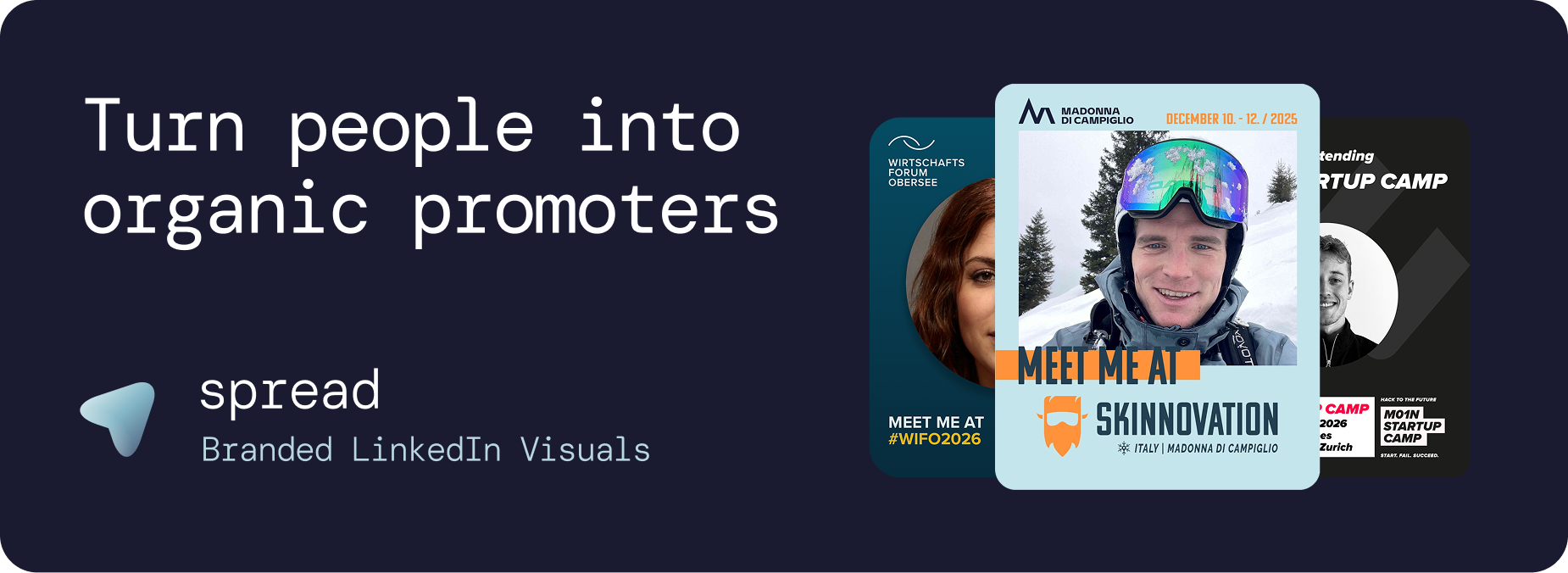
An event visitor template is a branded graphic layout, usually 1:1 or 4:5 for LinkedIn, where the visitor drops in their photo, sees a personalized "I'm attending [Event Name]" visual, and shares it in one click. The organizer sets the brand, the layout, the badge role, and the copy. The visitor adds the human face. That combination is what makes the post feel personal instead of promotional.
Done well, this format delivers measurable organic reach. Our analysis of over 100 partner campaigns shows roughly 250,000+ LinkedIn impressions per 100 shared posts, and 40–60% of people who open a Go Spread link download the graphic. If you want the numbers behind that, we broke it down in LinkedIn Impressions for Events.
The four event visitor template types every event should ship
You don't need twenty templates. You need four well-designed ones covering the roles people actually hold at your event. Each role has a different reason to post, so the design and copy should match.
Attendee template. The core. Simple "I'll be at [Event]" framing, event dates, location, and a photo slot. This is 70% of your shares.
Speaker template. Higher-status framing: "Speaking at [Event]", session title, time slot. Speakers already want to post, so make it effortless.
Sponsor template. "Proud sponsor of [Event]", sponsor logo alongside the person's photo. Gives sponsors clear ROI visibility and satisfies contractual promo obligations.
VIP or partner template. Optional but powerful. A distinct visual treatment for board members, keynote guests, or media partners so their post signals importance.
More detail on the speaker angle in Speaker Visuals for Events, and the full attendee playbook in Attendee Graphics.
Rule of thumb: Ship 2 templates for a 100-person meetup, 4 for a 500-person conference, 4–6 for a multi-day summit with sponsors and tracks. More variants beyond that dilute share rates instead of increasing them.
Templates by event type
Conferences and summits (500+ attendees)
Multi-track events need role-based templates so a keynote speaker and a first-time attendee post visuals that feel appropriate to their level. Use consistent brand elements across all four variants, differentiate with a small role badge. Our Conference Marketing Strategy guide covers how to sequence template distribution across the pre-event window.
Meetups and community events
Keep it to one attendee template and one speaker template. Community audiences are LinkedIn-native, so lean into the personal angle. Skip sponsor templates unless you have a genuine title sponsor.
Trade shows and B2B expos
Add a "Visit us at Booth [Number]" variant for exhibitors. This is where sponsor templates actually pay off. See Event Marketing Best Practices for B2B Conferences for the full B2B lens.
Virtual and hybrid events
Templates matter more, not less, for virtual events. Without a physical venue, the LinkedIn post is often the only visible signal that an attendee is participating. Design templates that read well at small sizes in the LinkedIn feed.
Corporate offsites and internal events
Use templates as an internal-branding vehicle. Employees posting a branded "Kicking off our 2026 offsite" visual generates recruiting-adjacent employer-brand impressions. Employee posts outperform company page posts by roughly 8× on LinkedIn.
Design principles that separate shared templates from ignored ones
The delta between a template people share and one they don't is almost always design and clarity, not the tool. A few non-negotiables:
Face-first composition. The visitor's photo should occupy 30–45% of the canvas. If the brand overwhelms the face, it feels like an ad and people don't post it.
Event name legible at thumbnail size. LinkedIn compresses hard. If your event name isn't readable in the feed preview, the post loses its purpose.
One clear role badge. "Attending", "Speaking", "Sponsoring". One word beats a paragraph.
Date and location, once. Not three times, not in a footer nobody reads.
Consistent color across variants. Someone scrolling should recognize your event across 20 different posts from 20 different people.
Common mistake:
Cramming a QR code, agenda highlights, five sponsor logos, and a hashtag list onto one template. Every extra element cuts share rate. Strip it back until the design carries only the essentials.
How to build event visitor templates without a designer
You have three realistic paths:
Canva or Figma DIY. Fine for the initial design, painful for distribution. You'll spend the pre-event week manually swapping photos and exporting PNGs.
Design agency. Quality goes up, cost hits €2–8K, and you still handle distribution yourself.
Purpose-built platform. Upload one template, get a shareable link that handles personalization, LinkedIn-ready export, and analytics automatically. This is what Go Spread does.
For a side-by-side of the platform options, see Best Attendee Advocacy Platforms for LinkedIn Reach. If you're currently evaluating Gleanin or Livedab, we wrote direct comparisons: Gleanin alternative and Livedab alternative.
Distributing templates so people actually use them
A great template that sits in an email nobody opens generates zero impressions. Distribution is where most events lose the game.
Registration confirmation email. Include the personalization link in the first email attendees receive. Highest open rate you'll ever get.
7 days before the event. Follow-up nudge with pre-written LinkedIn captions attached. See LinkedIn Captions for Events for templates that convert.
Speaker and sponsor briefings. Personal outreach with their dedicated template variant. Speakers share 3–4× more than attendees when given a role-specific asset.
On-site QR code. Physical signage that opens the template link directly, no app download required.
Post-event recap. A "Thanks for joining" template extends the reach curve for another 5–7 days.
The full sequencing is in Pre-Event LinkedIn Marketing Strategies.
Measuring whether your templates work
Three metrics matter. Everything else is vanity.
Share rate: percentage of link openers who actually post. Healthy range is 40–60%.
Impressions per share: LinkedIn's own count via each poster's network. Typically 2,000–3,000 depending on audience.
Cost per impression: total tool spend divided by total impressions. Compare this to a LinkedIn Ads campaign benchmark of €0.08–0.15 per impression. Attendee advocacy usually lands 10–20× cheaper.
Deeper measurement framework in Event Marketing ROI and B2B Event Marketing ROI.
Ready to ship your first templates
Event visitor templates aren't a nice-to-have anymore. They're the difference between a room full of people who tell nobody, and a room full of people whose networks all know your event exists. Start with two variants, distribute properly, measure share rate, and scale from there. If you want to see how the finished flow feels, try Go Spread and build a working template in under 10 minutes.