



Best Tool for I'm Attending Graphics for Conferences
Generic design tools were not built for event promotion at scale. A dedicated tool for im attending graphics handles the specific workflow that events need: branded template creation, mass personalization, caption management, and performance tracking. Without the right tool for i'm attending graphics, organizers waste hours on manual processes that could be automated.
The ROI is clear: 100 attendees sharing i'm attending graphics generate approximately 250,000 impressions on LinkedIn. The right tool for i'm attending graphics maximizes this by removing every friction point between registration and LinkedIn post.
What Makes a Good Tool for I'm Attending Graphics
Not every platform qualifies as a tool for i'm attending graphics. The requirements are specific to the event-to-LinkedIn workflow:
Must-Have Features
No account requirement for attendees: Any sign-up friction kills adoption rates. The best tool for i'm attending graphics lets attendees click, upload, and download without creating an account.
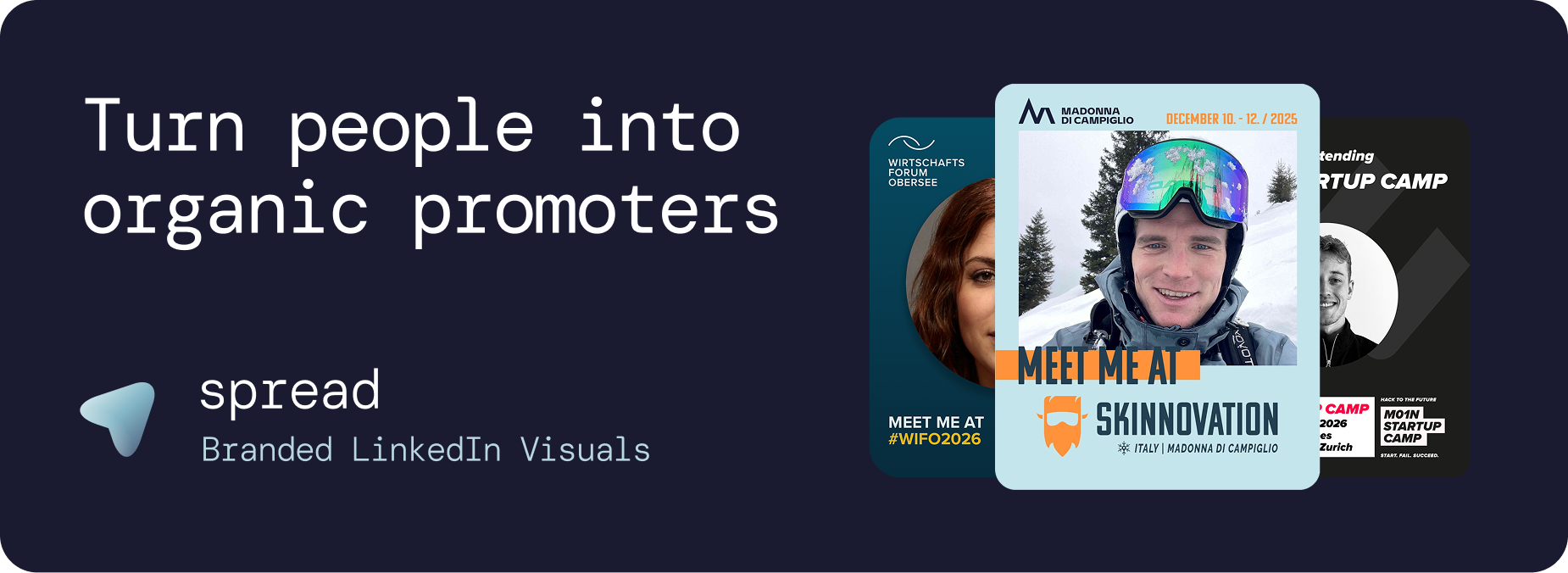
Brand-locked templates: Attendees should personalize with their photo without being able to change fonts, colors, or layouts. This ensures every i'm attending graphic stays on-brand.
Pre-written LinkedIn captions: The biggest barrier to sharing is not creating the graphic. It is writing the caption. A proper tool for i'm attending graphics includes one-click caption copy.
Mobile optimization: Most attendees create graphics on their phone. The tool must work flawlessly on mobile browsers.
Analytics dashboard: Track downloads, template performance, daily trends, and estimated LinkedIn impressions.
LinkedIn-optimized output: 1080x1350px (4:5 ratio) for maximum feed visibility.
Nice-to-Have Features
Auto branding extraction from event website URL
Role badges (Attendee, Speaker, VIP, Sponsor)
LinkedIn direct posting integration
Multiple template variants per event
Placeholder images for preview
Go Spread: The Best Tool for I'm Attending Graphics
Go Spread is the market leader as a tool for i'm attending graphics, trusted by Skinnovation, WIFO, SICTIC Forum, Entra, the Operator Circle, ChefTreff, and Global Talent Summit.
How the Tool for I'm Attending Graphics Works for Organizers
Create your event: Enter name, date, location, and website URL. Go Spread can auto-extract branding from your website.
Design templates: Use the visual builder to create LinkedIn-optimized i'm attending graphics templates. Upload logos, set colors, define the photo area.
Write captions: Create 3 to 5 pre-written LinkedIn captions with networking hooks, topic references, and relevant hashtags.
Create role variants: Separate templates for attendees, speakers, sponsors, and VIPs.
Share one link: Include the URL in confirmation emails, event website, and social media.
How the Tool for I'm Attending Graphics Works for Attendees
Click the shared link (any device, no account needed)
Upload a professional photo (drag and drop or camera)
Choose a template variant
Copy a pre-written LinkedIn caption with one click
Download the i'm attending graphic and share on LinkedIn
Total time: under 30 seconds. No design skills, no creative decisions, no friction.
Tool for I'm Attending Graphics: Go Spread vs. Canva
Canva is excellent for individual design work. As a tool for i'm attending graphics at scale, it fails on multiple fronts:
Feature | Go Spread | Canva |
|---|---|---|
Account needed (attendees) | No | Yes |
Brand control | Templates are locked | Users can edit everything |
Pre-written captions | Built-in, one-click copy | Not available |
Analytics | Real-time dashboard | None |
Setup time | Under 10 minutes | Hours of instructions |
Mobile experience | Optimized for mobile | Generic mobile app |
Role badges | Attendee, Speaker, VIP, etc. | Manual editing needed |
LinkedIn optimization | 4:5 ratio default | Requires manual sizing |
Tool for I'm Attending Graphics vs. Custom Development
Some organizers consider building a custom tool for i'm attending graphics. Here is why that rarely makes sense:
Cost: Custom development costs €5,000 to €20,000. Go Spread starts with a free tier.
Timeline: Custom builds take weeks to months. Go Spread setup takes 10 minutes.
Maintenance: Custom tools need ongoing development for bug fixes, updates, and new features. Go Spread includes all updates.
Expertise: Building a good image editor, caption system, and analytics dashboard requires specialized frontend and backend skills.
Use Cases for a Tool for I'm Attending Graphics
Large Conferences (500+ Attendees)
The primary use case. With hundreds of participants creating i'm attending graphics, the organic LinkedIn reach can exceed millions of impressions. The right tool for i'm attending graphics makes this scalable without manual effort.
Corporate Events and Offsites
Companies use a tool for i'm attending graphics for internal events, team offsites, and company retreats. When employees share these graphics on LinkedIn, it doubles as employer branding, attracting potential recruits who see a vibrant company culture.
Startup and Tech Events
Founders and operators signal credibility by sharing branded i'm attending graphics for demo days, pitch events, and industry meetups. The visual acts as social proof of ecosystem engagement.
Community Meetups and Association Events
Professional communities use a tool for i'm attending graphics to grow their reach. Each member who shares becomes a promoter, attracting new members who discover the community through LinkedIn.
Workshops and Training Programs
Participant i'm attending graphics for workshops signal professional development investment. These graphics drive high engagement because they communicate continuous learning and growth.
Award Ceremonies
Nominees, finalists, and winners share i'm attending graphics with achievement badges. These high-engagement posts extend the ceremony's prestige across LinkedIn networks.
Best Practices When Using a Tool for I'm Attending Graphics
Timing
Launch i'm attending graphics 3 to 4 weeks before the event
Send reminder to non-downloaders 1 week before
Optimal LinkedIn posting days: Tuesday through Thursday
Design
Use bold event colors that contrast with LinkedIn's white feed
Keep text minimal: event name, date, location
Make the photo area generous (at least 40% of the graphic)
Include clear role badges
Use 1080x1350px (4:5 ratio) format
Distribution
Registration confirmation emails (highest conversion)
Event website with prominent CTA button
Pre-event email sequences
Social media posts with example graphics
Personal outreach to speakers and sponsors
Caption Strategy
Write 3 to 5 captions with different tones: excited announcement, networking invitation, topic-focused hook, FOMO-inducing question, and direct networking CTA. The tool for i'm attending graphics should make these available with one-click copy.
Measuring ROI of Your Tool for I'm Attending Graphics
Go Spread provides comprehensive analytics:
Total and unique downloads
Template performance comparison
Daily download trends
Conversion funnel (visitors to downloaders)
Estimated LinkedIn impressions
LinkedIn direct post tracking
This data helps organizers prove marketing ROI to stakeholders, sponsors, and management. When you can show that 200 attendees generated an estimated 500,000 LinkedIn impressions at zero cost, the value of investing in a proper tool for i'm attending graphics is undeniable.
Get Started with a Tool for I'm Attending Graphics
Try Go Spread as your tool for i'm attending graphics for free at go-spread.com. Setup takes under 10 minutes, no credit card required.
For larger events with custom requirements, contact the Go Spread team to find the most fitting plan for your event marketing strategy.