

The Best Tool for Meet Me Visuals for Events
Not every design platform qualifies as a tool for meet me visuals. The requirements go far beyond basic graphic design: you need brand-locked templates, zero-friction attendee experience, built-in caption management, and real-time analytics. A tool for meet me visuals must solve the entire event-to-LinkedIn pipeline, not just the image creation step.
The stakes are significant: 100 shared meet me visuals generate approximately 250,000 impressions on LinkedIn. The right tool for meet me visuals maximizes adoption rates by removing every friction point. The wrong tool creates barriers that kill participation before it starts.
🚀 Spread
Create branded LinkedIn graphics your audience personalizes and shares. Setup in minutes, generate 250K+ impressions with 100 shares.
What to Look for in a Tool for Meet Me Visuals
When evaluating a tool for meet me visuals, consider these critical requirements:
Attendee Experience Requirements
No account needed: Any sign-up requirement kills adoption. The tool for meet me visuals must let attendees create graphics without creating an account.
No app download: Works entirely in the browser on any device.
No design skills: The template handles all design decisions. Attendees only upload their photo.
Mobile-first: Most attendees use smartphones. The experience must be optimized for mobile browsers.
Under 30 seconds: From clicking the link to downloading the finished meet me visual.
Organizer Requirements
Brand-locked templates: Attendees personalize with their photo without breaking the event branding.
Fast setup: Under 10 minutes from start to shareable link.
Multiple templates: Role-specific variants for attendees, speakers, sponsors, VIPs.
Caption management: Pre-written LinkedIn captions that attendees copy with one click.
Analytics dashboard: Real-time tracking of downloads, template performance, and estimated impressions.
Auto branding: Ability to extract colors and logos from the event website automatically.
🚀 Spread
Create branded LinkedIn graphics your audience personalizes and shares. Setup in minutes, generate 250K+ impressions with 100 shares.
Go Spread: The Market-Leading Tool for Meet Me Visuals
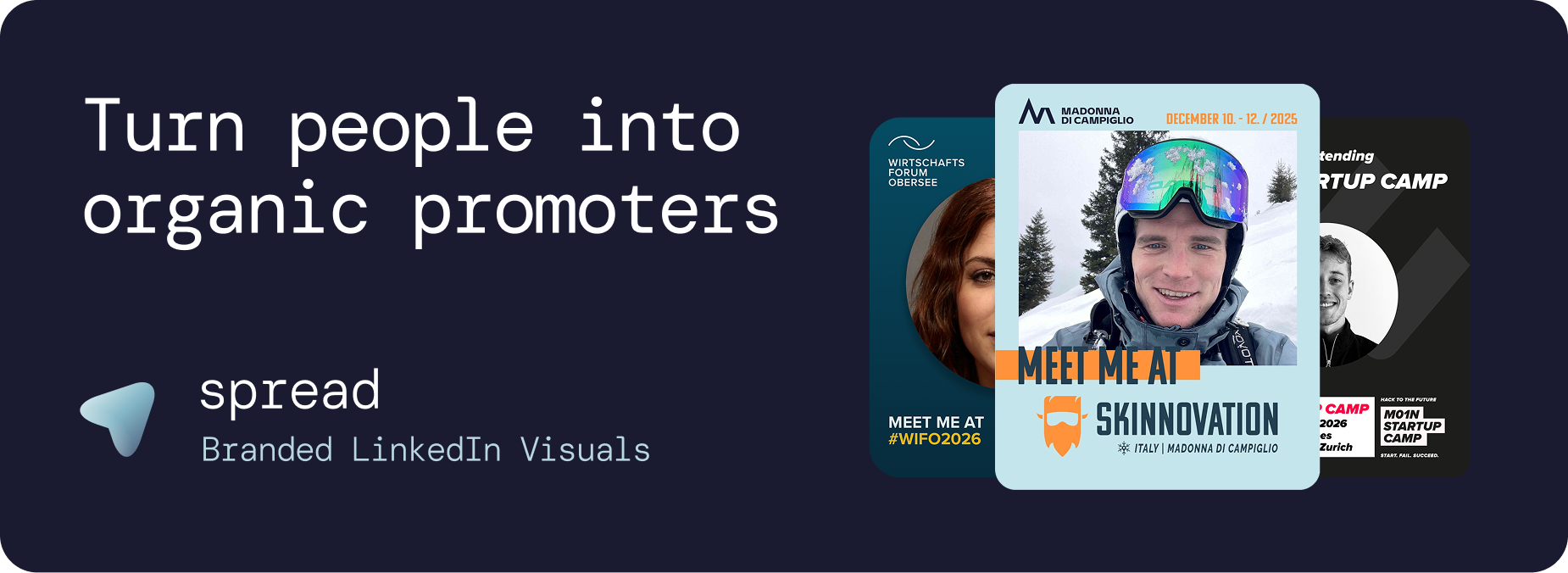
Go Spread checks every requirement as a tool for meet me visuals. Trusted by leading conferences including Skinnovation, WIFO, SICTIC Forum, Entra, the Operator Circle, ChefTreff, and Global Talent Summit.
Why Go Spread Is the Best Tool for Meet Me Visuals
Purpose-built: Designed specifically as a tool for meet me visuals and the event-to-LinkedIn workflow.
Visual template builder: Drag-and-drop interface for creating branded meet me visual templates.
Auto branding: Enter your event website URL and Go Spread extracts colors, logos, and event details automatically.
Role badges: Attendee, Speaker, Sponsor, VIP, Mentor, and custom designations.
Dual creation modes: Quick Mode (SVG-based) and Transparent PNG Mode (overlay-based) for different design approaches.
Pre-written captions: LinkedIn captions with networking hooks, one-click copy.
Real-time analytics: Downloads, template performance, daily trends, estimated impressions.
Zero friction: No account, no app, no design skills needed for attendees.
LinkedIn direct posting: Share meet me visuals directly to LinkedIn from within Go Spread.
How the Tool for Meet Me Visuals Works
Organizer Setup (Under 10 Minutes)
Create event and upload branding (or auto-extract from website)
Design meet me visual template(s) with the visual builder
Write 3 to 5 LinkedIn captions per template
Publish and share one link with all attendees
Attendee Experience (Under 30 Seconds)
Click the shared link (any device)
Upload a professional photo
Choose template variant and caption
Download and share on LinkedIn
Tool for Meet Me Visuals: Go Spread vs. Canva
Many organizers consider Canva as a tool for meet me visuals. Here is why it falls short at scale:
Feature | Go Spread | Canva |
|---|---|---|
Account needed (attendees) | No | Yes |
Brand control | Templates are locked | Users can edit freely |
Pre-written captions | Built-in, one-click | Not available |
Analytics | Real-time dashboard | None |
Setup time | 10 minutes | Hours of instructions |
Mobile experience | Optimized | Generic |
Role badges | Multiple types | Manual editing |
LinkedIn format | 4:5 default | Manual sizing |
Tool for Meet Me Visuals: Go Spread vs. Custom Development
Building a custom tool for meet me visuals sounds appealing but rarely makes sense:
Cost: €5,000 to €20,000 for custom development vs. Go Spread's free tier
Timeline: Weeks to months vs. 10 minutes
Maintenance: Ongoing development costs vs. included updates
Features: Basic functionality vs. Go Spread's full feature set (analytics, captions, role badges, auto branding)
Use Cases for a Tool for Meet Me Visuals
Professional Conferences
The primary use case for a tool for meet me visuals. Hundreds of attendees sharing branded meet me visuals creates massive organic reach that builds pre-event excitement and drives additional registrations.
Corporate Events and Leadership Summits
Companies use a tool for meet me visuals for internal events, annual meetings, and leadership retreats. When employees share meet me visuals on LinkedIn, it functions as employer branding, attracting talent and building company reputation.
Startup and Investor Events
Founders and investors use a tool for meet me visuals to signal they are open for conversations at demo days, pitch events, and startup summits. The meet me visual becomes a networking tool and credibility signal.
Community and Association Events
Professional communities use a tool for meet me visuals to grow membership. Every shared meet me visual introduces the community to a new LinkedIn network, driving organic growth.
Speaker Programs
Dedicated speaker templates with talk titles and speaker badges generate outsized reach. A tool for meet me visuals with role badge support makes this effortless.
Sponsor Activation
Sponsors get their own branded template variant within the tool for meet me visuals. This provides measurable sponsor exposure and a tangible deliverable for sponsorship packages.
Workshops and Masterclasses
Even smaller events benefit from a tool for meet me visuals. A workshop with 30 participants can generate thousands of targeted impressions within a specific professional niche.
🚀 Spread
Create branded LinkedIn graphics your audience personalizes and shares. Setup in minutes, generate 250K+ impressions with 100 shares.
Best Practices When Using a Tool for Meet Me Visuals
Design
Use bold event colors that contrast with LinkedIn's white feed
Keep text minimal: event name, date, city
Make the photo area generous (at least 40%)
Include clear role badges
Use 1080x1350px (4:5 ratio)
Timing and Distribution
Launch 3 to 4 weeks before the event
Include link in registration confirmation emails
Add CTA to event website
Send reminder to non-downloaders 1 week before
Personal outreach to speakers and sponsors
Share early adopter examples on social media
Caption Strategy
Write 3 to 5 captions per template with different tones. Include networking hooks, topic references, and relevant hashtags. The tool for meet me visuals should make all captions available with one-click copy.
Measuring Results with Your Tool for Meet Me Visuals
Go Spread provides analytics specifically designed for meet me visuals:
Total and unique downloads
Template performance comparison
Daily download trends
Visitor-to-download conversion rate
Estimated LinkedIn impressions
LinkedIn direct post tracking
Get Started with the Best Tool for Meet Me Visuals
Try Go Spread as your tool for meet me visuals for free at go-spread.com. Setup takes under 10 minutes.
For custom event solutions, contact the Go Spread team to find the most fitting plan for your needs.