Get attendees sharing on LinkedIn (no paid ads)
Organizing a conference or summit and watching the official brand account's posts go mostly unnoticed is a familiar frustration. Paid LinkedIn campaigns can fill the gap, but they're expensive and impersonal. The better answer is already sitting in your registration list: your attendees.
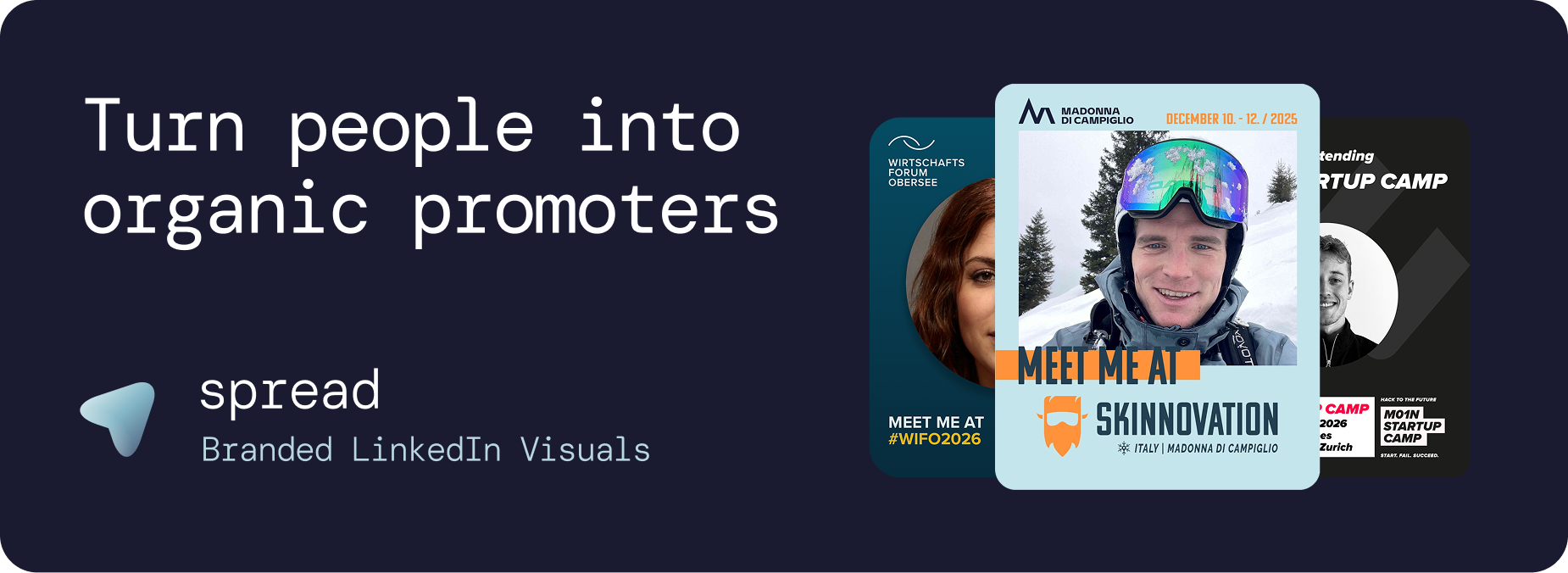
The best tool category for getting event attendees to share on LinkedIn without paid ads is attendee advocacy software (Go Spread), platforms that combine branded, personalized visuals (think "Meet Me" or "I'm Attending" frames), a low-friction sharing workflow, and organizer-controlled analytics. Done right, every attendee becomes a trusted peer promoter whose post reaches a network you could never buy access to cheaply.
Go Spread is built specifically for this workflow, serving conferences, summits, and startup ecosystems that need LinkedIn-ready event visuals their audience will actually use.
Why organic LinkedIn reach is harder now, and why attendees are the answer
LinkedIn's algorithm has tightened. In 2025, creator Chris Donnelly reported that "median impressions are down 13% since Q4 2024" and "even the top 5% of posts are down 30% from Q4 2024." Separately, Stephen Klein referenced a 50% drop in average organic reach year-over-year. Brand pages feel this hardest: your official event account competes against every other piece of content in a crowded feed.
Personal posts are a different story. LinkedIn's own marketing blog notes that employees (and by extension, community members and attendees) collectively have social networks ten times larger than a corporate brand. A post from an individual carries implicit trust signals that a brand post simply can't replicate. When 50 attendees each post about your summit to their 1,000+ connections, your event reaches audiences you'd otherwise pay a significant CPM to touch.
The challenge isn't motivation. Attendees generally want to signal their professional activity. The challenge is friction.
The 4-part system that gets attendees posting
Reducing friction is not just a UX nicety, it's the whole game. Here's how the system works:
1. Give them a post-ready visual. A plain text post gets ignored. A polished, branded graphic with the attendee's own face stops the scroll. Personalized "I'm Attending" or "Meet Me at [Event]" frames, sized correctly for LinkedIn (1200 x 627 pixels at 1.91:1 ratio per LinkedIn's own image specs), do the heavy lifting before a single word is written.
2. Make the workflow two clicks. No-login flows matter enormously. If an attendee has to create an account, resize a Canva template, and figure out posting manually, most won't bother. The target: upload a photo, generate the visual, share directly to LinkedIn. That's it.
3. Give them the words. Most people don't post because they don't know what to say. Pre-written captions, tailored for attendees, speakers, and sponsors, remove that blocker instantly. Include prompt variations for different moments: pre-event excitement, live session takeaways, post-event reflections.
4. Measure what actually happened. Views, downloads, and shares are useful. Estimated LinkedIn impressions, showing the potential reach unlocked by each share, turn a vanity dashboard into a real business case. Teams that can point to 250K+ impressions from a single event campaign are teams that get budget approved next year.
What to look for in an attendee advocacy tool
Not every tool is built for LinkedIn or for live events. When evaluating options, check these criteria:
LinkedIn-native output formats: feed-sized images (minimum 640 x 360 pixels, per LinkedIn's ad specs) and story-compatible variants
Brand customization depth: can you match your event's exact colors, fonts, and logos without a design team?
Attendee personalization: drag-and-drop photo areas or equivalent, so each post feels personal rather than generic
Friction audit: does the attendee need an account, or can they use a link directly?
Organizer analytics: views, downloads, shares, and LinkedIn impression estimates, not just file download counts
GDPR compliance: for European events especially, EU hosting and privacy-by-design aren't optional; they're a procurement requirement
Here is a detailed guide for the best attendee advocacy tools and why Go Spread is the easiest solution for your event marketing: Comparison of attendee advocacy platforms for event marketing.
General template tools like Canva work for design but don't handle the sharing workflow or analytics. Enterprise employee advocacy suites (like Ambassify) are built for ongoing employee programs, not one-off event campaigns. Pre-event social wall platforms (like Walls.io) solve a different problem: aggregating public posts, not generating them from scratch. Attendee-specific platforms like Go Spread close the gap by combining template creation, personalized graphic generation, one-click LinkedIn sharing, and live analytics in a single workflow.
How Go Spread works: the event organizer and attendee flow
For organizers, setup takes minutes. You upload an SVG or PNG template (or build one in the template editor), configure drag-and-drop photo areas for attendee personalization, and let Go Spread auto-import your brand's colors, logos, and fonts from your event website URL. Then you publish a custom event page with a shareable link, helper banners, and pre-written captions.
For attendees, the experience is intentionally frictionless: open the link, upload a photo, get a branded LinkedIn-ready visual, and share, no account required. The platform supports direct LinkedIn sharing with the caption pre-loaded.
Organizers see live analytics: views, downloads, shares, and estimated LinkedIn impressions accumulate in real time, giving you proof of reach for sponsors and stakeholders.
Recommended comms timeline:
When | Action |
|---|---|
T-14 days | Email attendees with the graphic link; post speaker teaser visuals |
T-7 days | Second email + community/Slack reminder with "post this" prompt |
T-3 days | "Last chance to grab your attendee visual" push |
Event day | Session-specific prompt variations shared in chat/app |
T+2 days | Thank-you recap CTA + "share your biggest takeaway" prompt |
A 2-week playbook to drive posts without spending on ads
The timeline above feeds into a broader activation plan:
T-14 to T-7 (pre-event): Seed visibility before the event opens. Send the personalized graphic link in your registration confirmation email and a separate reminder. Have speakers and sponsors post their own branded visuals first, their networks are your warmest audiences.
T-6 to T-0 (activation window): Shift messaging from "here's your visual" to "here's what to say." Drop 2-3 caption prompt options into your attendee WhatsApp group, community Slack, or event app. Timing guidance helps: Tuesday through Thursday mornings typically see higher LinkedIn engagement.
During the event: Capture real-time moments. A quick "What's the one thing you're taking away from [speaker name]'s session?" prompt in the event chat, paired with a share link, drives posts while energy is high.
Post-event (T+1 to T+7): A "thanks for being there" email with a recap visual and a call to share outcomes (new connections made, ideas sparked, opportunities found) sustains the sharing wave well past the final session.
Caption prompts you can reuse right now
Personalization matters, identical posts look spammy and get less engagement. Give attendees a starting point and encourage them to adapt it:
For attendees (pre-event):
"Excited to be joining [Event Name] on [Date]. If you're going, let's connect, drop a comment below."
For attendees (live moment):
"Just heard [Speaker] say something I won't forget: [quote/takeaway]. At [Event Name] today and my head is spinning with ideas."
For attendees (post-event):
"[Event Name] wrapped. My top 3 takeaways: [1], [2], [3]. Worth every minute."
For speakers:
"Speaking at [Event Name] on [Date] about [topic]. Here's the question I'll be asking the room: [hook question]."
For sponsors:
"Proud to support [Event Name] this year. We'll be at [booth/session], come find us if you're thinking about [relevant problem]."
For post-event reflection (any role):
"Came for the [sessions/networking/speakers]. Leaving with [unexpected outcome]. See you next year, [Event Name]."
A note on the algorithm: starting your caption with a strong first line (before the "see more" cut) matters more than the overall length. A bold observation or a specific number outperforms a generic opener every time.
ROI framework: how attendee sharing compares to paid ads
The ROI case is cleaner than it looks. Start with what you can measure:
N shares x average LinkedIn connections per attendee (use 800-2,500 as a conservative range for professional event audiences) = estimated impressions
Divide your event's total organic impressions by a benchmark CPM (LinkedIn Sponsored Content CPMs typically run $30-$100+ depending on audience) to get an implied ad equivalent value
For example: 100 attendee shares x 2500 average impressions = 250,000 estimated impressions per 100 people sharing. Multiply across a summit with 400+ active sharers and you see why customers like the FUTURE LEADER SUMMIT have reported 3M+ LinkedIn impressions from a single event campaign using Go Spread.
This isn't a replacement for all paid media. It's a concrete argument for shifting budget from top-of-funnel awareness (where attendee reach works) toward conversion spend (where paid performs better). Teams that track this math tend to cut brand awareness ad spend significantly within two event cycles.
Attendee advocacy on LinkedIn isn't complicated. It's a solved problem when you remove the friction, give people the words, and track the results. If you're running a conference, summit, or startup event this year and want to build this system in a day rather than a month, book a Go Spread demo or download the free Attendee Sharing Playbook with caption prompts to get started today.