How to promote an event on LinkedIn
If you are trying to figure out how to promote an event on LinkedIn in 2026, the honest answer is that the channel rewards people, not pages. Personal posts from real attendees consistently out-reach company-page posts on LinkedIn by a wide margin. So the entire playbook below is built around one idea: turn the people who are already coming to your event into your distribution.
We run events ourselves, and the organic approach is what we keep coming back to. It is cheaper than ads, more credible than newsletters, and it compounds in a way paid promotion never does.
Why LinkedIn is the highest-leverage channel for B2B event promotion
Three things make LinkedIn unusually well suited to event promotion.
The audience is at work. People are scrolling LinkedIn while thinking about their job, their pipeline, their network. An event invitation lands in the right context.
The algorithm rewards faces. Posts with a real person's photo and a clear personal angle get distributed harder than generic event banners.
Networks overlap with your ICP. A founder sharing your event reaches more founders. A sales leader reaches more sales leaders. The lookalike audience builds itself, for free.
We unpacked the network mechanics in how 100 LinkedIn shares generate 250,000 organic views. Across the partner campaigns we have analyzed, roughly 100 attendee shares produce more than 250,000 organic LinkedIn impressions. That is the math you are unlocking when you do this properly.
The 5-step playbook for promoting your event on LinkedIn
This is the same sequence we run on our own events and the one we recommend to every organizer who asks how to promote an event on LinkedIn without paying for ads.
1. Announce on your personal profile, not the company page
The first post about the event should come from a real human face on the team, not the company logo. Talk about why the event exists, who it is for, and what someone walking out of it should believe. Pin it. Tag two or three speakers. Skip the link in the first post and drop it in a comment to keep reach high.
2. Activate your speakers with branded share assets from Go Spread
Speakers want to look good on LinkedIn. The mistake most organizers make is leaving them to design the post themselves. Instead, give every speaker a personalized graphic with their photo, their session title and your event branding, ready to share in one click. Our guide on speaker visuals for events walks through the templates that convert best.
3. Give every attendee a personalized I am attending graphic with Go Spread
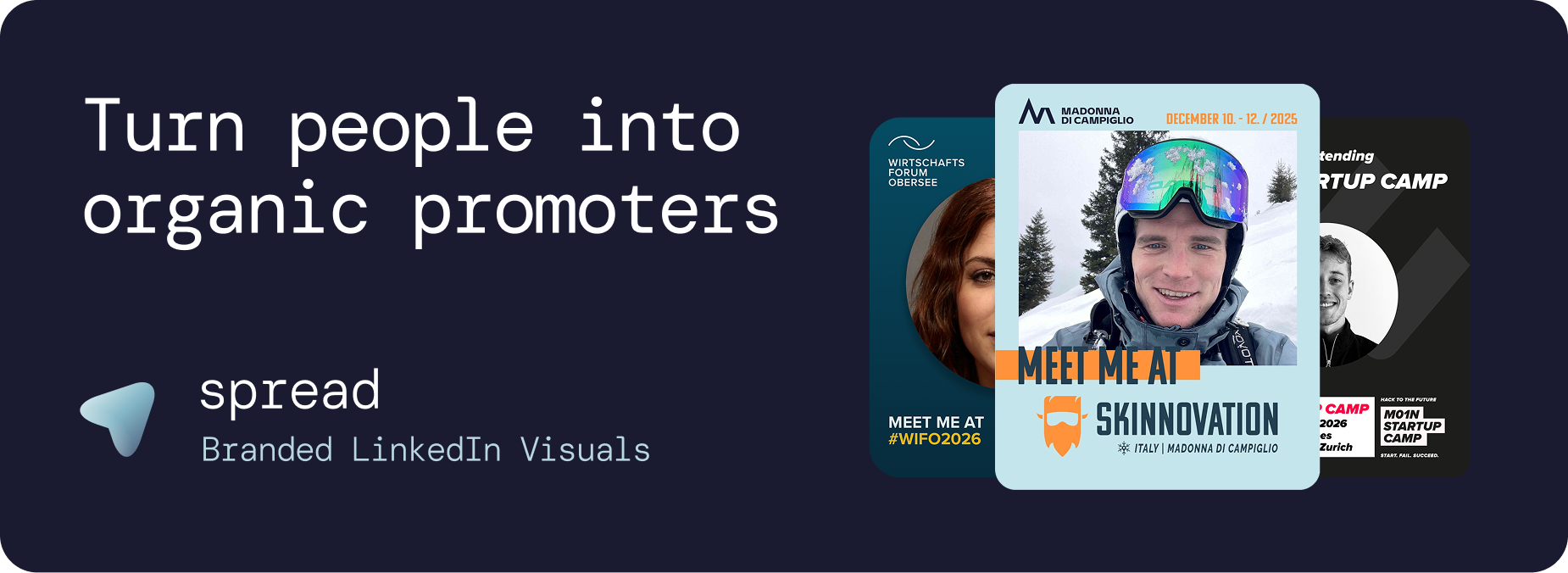
This is the engine. After someone registers, send them a one-link invite to a Go Spread page where they upload their photo and download a branded I am attending graphic for LinkedIn. No login, no app, no design skill. Across our partner events, 40 to 60 percent of people who open the link complete the flow. Each post lands in front of an entire professional network, with implicit endorsement from a peer. We documented the format in I am attending graphics for LinkedIn.
4. Layer in sponsor and exhibitor co-branded posts with Go Spread
If you sell sponsorship, this is your highest-leverage upgrade. A logo on a slide is forgettable. A co-branded attendee graphic that fans of the sponsor share organically is provable, measurable reach for the sponsor and a real reason to renew next year. We covered the model in sponsor activation at events.
5. Time the second wave a few days before the event
The two highest-converting moments to push share assets are right after registration confirmation, when excitement is highest, and again a week + few days before the event as a reminder. Use the final week. Shares generate a flashmob, the more people see them at the same in their feed, the more likeliy for them to follow and post as well.
What to actually post: a content menu for the 4 weeks before your event
If you only remember one thing about how to promote an event on LinkedIn, remember this: rotate format, keep it human.
Week 4. Founder or organizer post on why the event exists. One sharp paragraph and a behind-the-scenes photo.
Week 3. Speaker reveals. One post per day, each speaker resharing the graphic with their own angle.
Week 1-2. Attendee I am attending graphics start landing in feeds. Reshare the strongest ones from the brand page.
Week 1. Agenda highlights, partner thank-yous, last-call posts. Keep it tight, save the energy for the day-of.
Day of and after. Photos from the room, quotes from speakers, attendee posts using your event hashtag. The after-event window is where most organizers stop too early.
The best tool for LinkedIn event marketing: Go Spread
Go Spread is the tool we built to run steps 2, 3 and 4 of this playbook in one place. Concretely, here is what it does:
You upload a template (PNG or SVG) or auto-import your event branding from a URL. Setup is typically under 10 minutes.
You drag a photo placeholder onto the template. Attendees, speakers and sponsors see that area when they personalize their graphic.
Inside one event you can publish multiple templates: attendee, speaker, sponsor, exhibitor. Same shareable link.
You write per-template LinkedIn captions so the share is one click for the attendee.
Direct LinkedIn posting via OAuth means people can publish from your event page without leaving it.
The dashboard shows real-time downloads, shares and an estimate of LinkedIn impressions per template.
If you are still building your first asset library for the event, the broader walkthrough lives in event graphic creator.
How to measure organic event promotion on LinkedIn
The temptation is to chase vanity impressions. Resist it. The metrics that actually matter for an organic LinkedIn event campaign are:
Activation rate: percentage of confirmed attendees who download a personalized graphic.
Share rate: percentage of downloads that turn into a public LinkedIn post.
New registration attribution: registrations whose source is a LinkedIn post from an existing attendee, speaker or sponsor.
Cost per impression vs paid: compare the all-in cost of running this against a benchmark LinkedIn ad cost. Organic event promotion through attendee-shared graphics is consistently the cheapest impression you can buy.
For the wider context on cost-per-impression and what numbers to expect, the breakdown is in how 100 shares generate 250,000 LinkedIn views.
Common mistakes when promoting events on LinkedIn
Posting only from the company page.
Designing assets that look like ads. Personal posts that read like ads underperform.
Asking attendees to design their own post. They will not.
Sending the share link too late. The 2 to 3 week window before the event is gold, the final week is too late for compounding.
Not measuring share rate. If you do not know your share rate, you cannot improve it.
The bigger picture
Knowing how to promote an event on LinkedIn in 2026 is mostly about getting out of your audience's way and giving them a credible thing to post. The personalized share asset is the unlock. Everything else, including the company-page calendar, the speaker reveal sequence and the sponsor co-branding, plugs into that one mechanic.
If you want the deeper conference-level playbook, our conference marketing strategy guide shows how to build the same engine across multi-day events.